
CubixPlayer
FluxconvergeVideo Players & Editors
0.00.00 Reviews
- Version
- 3.0.0
- Installs
- 100.00K
- Age Rating
- Everyone
Screenshots
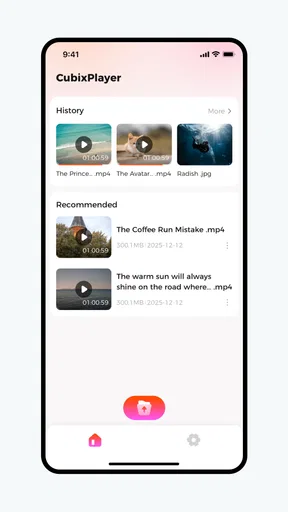
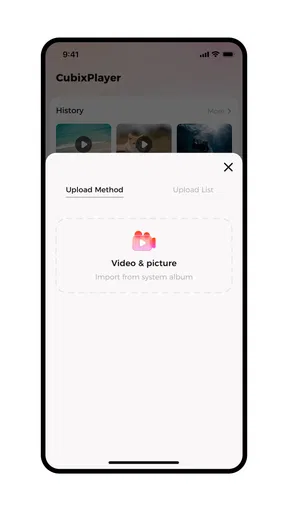
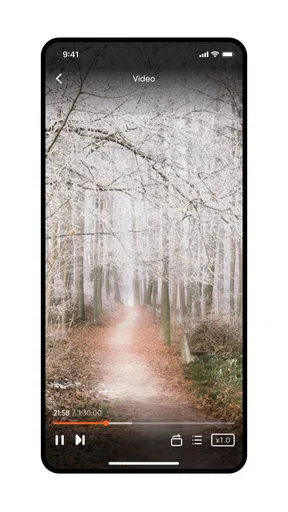
Our Review of CubixPlayer
 Analysis by Appyee
When I try a new video player, I pay attention to the small moments that decide whether I will keep using it: finding a file without hunting through menus, starting playback without confusion, and recovering quickly when something does not behave as expected. CubixPlayer, from Fluxconverge, is aimed at that straightforward video-watching job. It is a free Android app in the video players and editors category, and its simple store summary—video playback—matches the basic purpose I found in practice.
My overall impression is that CubixPlayer is most interesting for people who want a focused way to open and watch videos rather than a large media platform filled with recommendations, social features, or editing tools. That focus can make an app easier to approach, especially when a busy interface becomes tiring. At the same time, a focused player has to be especially clear about its controls and file handling, because users cannot rely on a long list of extra tools to compensate for friction.
How CubixPlayer feels to read, navigate, and control
I look at CubixPlayer through the small decisions that shape everyday use: whether I can identify the right video, follow what is on screen, and make playback adjustments without losing my place. That matters especially when a player is meant to stay simple rather than become another media hub. I’ll focus on how those choices affect comfort and control, then consider what makes the app worth keeping in a regular routine.
A focused starting point is easier to understand
The first advantage of a playback-only tool is mental simplicity. I do not have to interpret a feed, decide what the app wants me to watch, or move through unrelated sections before reaching a video. For someone who mainly wants to open a recording, a downloaded clip, or a personal video, that narrower purpose is useful. It also makes CubixPlayer less intimidating than a full media suite for a family member who only needs the play button and basic viewing controls.
That simplicity matters for readability as much as it does for speed. A screen with fewer competing destinations gives the eyes fewer places to search. People who are easily distracted, users working on a small phone, and anyone who prefers predictable routines may appreciate that kind of restraint. I found the app easier to think about as a tool than as a destination: choose a video, begin playback, and return when finished.
There is a practical trade-off here. A minimalist player can be friendly when its labels and controls are obvious, but it offers less guidance when a file is difficult to locate or a playback problem appears. A user who expects a detailed media library, automatic organization, or a rich settings area may find the experience too bare. CubixPlayer is better suited to direct playback than to managing a complicated archive.
Why navigation style matters for different abilities
For users with limited vision, clear hierarchy is more important than decoration. I would approach CubixPlayer by checking whether the file list, playback controls, and current selection are visually distinct on the particular phone being used. Screen size, display scaling, brightness, and the user’s preferred contrast all affect the result, so an interface that feels comfortable to one person may still require adjustment for another.
For users with reading difficulties or cognitive fatigue, a short path to playback is a genuine benefit. The app’s narrow purpose reduces the amount of language and decision-making involved. I would still recommend testing the routine with the person who will use it: can they recognize a video, start it, pause it, and return to the list without assistance? That quick trial is more useful than assuming that a simple app will automatically suit every user.
One useful habit is to keep the video collection itself organized before opening CubixPlayer. Descriptive file names and a small number of clearly separated folders can reduce the need to scan a long, confusing list. This is not a special feature of the app, but it changes how accessible the whole workflow feels. When the player is intentionally focused, preparation outside the player has a larger effect on everyday comfort.
Playback controls and the cost of precision
Video playback looks simple until a user needs to pause at an exact moment, move back a few seconds, or avoid accidental touches. People with tremors, reduced dexterity, or difficulty maintaining a steady touch may find small on-screen controls demanding. I would use the app with the phone supported on a table or stand rather than holding it in midair, especially during longer viewing sessions.
A stand also helps users who experience hand or arm fatigue. It separates the physical task of holding the device from the visual task of watching. In a shared household, that can make CubixPlayer more comfortable for an older viewer who wants to watch a personal recording without continuously gripping a phone.
The important limitation is that a simple playback app cannot solve every motor-access problem by itself. If a viewer needs highly customizable gestures, unusually large controls, or a specialized remote-control workflow, a more configurable player may be a better choice. CubixPlayer makes sense when ordinary touch interaction is manageable and the priority is avoiding unnecessary complexity.
Sensory comfort during longer viewing
Video can be tiring even when the player works correctly. Rapid movement, flashing content, loud changes in volume, and bright screens affect people differently. I would treat CubixPlayer as the viewing surface rather than assuming the app can make every video comfortable. Choosing calmer content, lowering screen brightness, and taking breaks are still part of a sensible routine.
For someone sensitive to sound, headphones may provide more control than a phone speaker, but that depends on the listener and the environment. A person who needs to remain aware of nearby sounds may prefer low speaker volume instead. The best setup is situational: a quiet room, a shared living space, public transport, and a bedside viewing session all call for different choices.
Captions are another important consideration for people who are deaf or hard of hearing, viewers learning a language, and anyone watching with the sound muted. Whether captions are available depends on the video and the playback experience, so I would test an actual captioned file before making CubixPlayer the main player for someone who relies on text. If caption presentation is central to the user’s needs, a player known for extensive subtitle controls may be the safer option.
Using CubixPlayer in ordinary situations
A realistic example is a family member sending a short phone recording that needs to be watched several times. Instead of opening a social platform or a full editing application, I would use a direct player, keep the phone propped up, and replay the clip while taking notes. The focused approach is useful because the task is viewing, not publishing, trimming, or browsing.
Another situation is checking a downloaded instructional video during a commute. A compact player can be convenient when the user already knows which file they need. However, public spaces introduce glare, noise, movement, and limited hand stability. In that context, a larger screen or a device with more reliable external-control options may be preferable. CubixPlayer’s usefulness depends less on the label “mobile player” than on how well the surrounding conditions support the viewer.
It can also fit a shared-device routine. One person may use the phone for a personal recording, another for a lesson, and another for a saved clip. A direct playback tool avoids the distraction of recommendations and accounts. I would still keep personal files clearly separated, because a simple player does not replace careful file organization or privacy habits.
What the app is, and what it is not
CubixPlayer should not be confused with a video editor simply because it appears in a category that includes both players and editors. Its stated purpose is playback. I would choose it to watch videos, not to cut scenes, add titles, create transitions, or prepare a finished export. Someone building social clips or correcting footage should look for an editing-focused application instead.
It also is not a streaming service in the way a subscription video platform is. Its appeal is strongest when the user already has a video available to open. That makes it a sensible companion for personal recordings and saved files, but less useful for someone whose main expectation is discovering online content inside the same app.
Compared with a phone’s built-in gallery, CubixPlayer may appeal to users who want a separate playback destination rather than mixing videos with photographs and screenshots. Compared with a feature-heavy third-party media player, it may feel calmer and quicker to understand, but it may not satisfy people who need extensive format controls, library automation, or detailed subtitle behavior. The right choice depends on whether clarity or depth is the higher priority.
Compatibility, cost, and what to expect over time
The app is free to install, with optional in-app purchases ranging from a few dollars to amounts approaching thirty dollars per item. I would therefore begin with the free experience and only consider a purchase after identifying a specific benefit that matters to my own routine. For a basic viewer, paying without knowing what problem the purchase solves would be difficult to justify.
CubixPlayer requires Android 7.0 or later, so owners of older phones should check compatibility before planning a switch. On supported devices, performance will still depend on the video itself, available storage, and the phone’s hardware. A player can be easy to navigate and still struggle with a demanding file or an unusual encoding; that is a general practical limitation worth remembering when testing any playback app.
Fluxconverge lists the current release as version 3.0.0, and the app was released on April 21, 2026. It has passed the 100K-plus install mark and carries an Everyone age rating. Those details suggest that CubixPlayer is positioned as a broadly approachable utility rather than an app aimed at a narrow professional audience. They do not remove the need for personal testing, particularly for users who depend on specific accessibility routines.
Remaining barriers I would consider before switching
The biggest barrier is the gap between simple playback and specialized access needs. A user may need dependable captions, very large controls, audio descriptions, external switches, or a carefully adjustable interface. If those needs are essential, I would not choose CubixPlayer solely because its purpose sounds uncomplicated. I would verify the exact workflow with the person who will use it and compare it with a player built around those requirements.
File discovery can be another source of friction. When videos come from messaging apps, downloads, cameras, and cloud folders, the same clip may appear in several places or carry an unhelpful name. I would create a dedicated folder for frequently watched material and rename files in a consistent way. This reduces visual scanning and makes the app more practical for users who find long lists overwhelming.
There is also a social barrier: people often share a phone, watch in noisy rooms, or need to keep the screen visible without disturbing others. A player cannot control the room, the quality of the recording, or the viewer’s hearing and vision needs. A stand, headphones, captions, a larger display, or a quiet location may improve access more than switching between similar apps.
Finally, users should be realistic about the difference between “easy to start” and “easy for everyone.” A clean playback tool may remove distractions, but it does not automatically provide every accessibility option. That distinction is important for caregivers and families choosing an app for someone else. The best test is a short, real task using the person’s own videos and preferred device settings.
My inclusive verdict
I see CubixPlayer as a sensible option for Android users who want a free, focused way to watch local or saved videos without entering a crowded media ecosystem. Its strongest quality is its narrow purpose: fewer distractions can mean less visual and cognitive effort, particularly for straightforward viewing routines. It is also a reasonable starting point for households that want a simple player for personal recordings and everyday clips.
I would recommend it most confidently to people who can work comfortably with standard touch controls and who do not need advanced editing or highly specialized playback customization. I would be more cautious for anyone who depends on precise subtitle handling, alternative input methods, unusually large controls, or a deeply managed media library. In those cases, a more configurable alternative may be worth the extra complexity.
My practical advice is to test three things before settling in: locate a real video, control playback without rushing, and watch for long enough to notice visual or physical fatigue. If that routine feels natural, CubixPlayer’s focused design may be exactly the point. The most inclusive choice is not the app with the longest feature list, but the one that lets the intended viewer complete the task comfortably and independently.
Verdict
Strengths of CubixPlayer
- Supports multiple video and audio formats without extra converters.
- Simple interface makes browsing local media quick and straightforward.
- Offers useful playback controls, including seeking and speed adjustment.
- Can play content stored directly on the device without an internet connection.
- Lightweight design generally uses less storage than feature-heavy media players.
Limitations of CubixPlayer
- Some advanced codecs or files may not play correctly on every device.
- Subtitle customization options may be limited compared with desktop players.
- The app may lack built-in access to popular streaming platforms.
- Large media libraries can feel less organized without advanced sorting tools.
- Background playback and casting support may vary by device or file type.
Similar Picks in This Category
View All
Google TV
Google LLC3.9

iTunes
Apple4.7

YouTube
Google LLC3.8

MX Player
Amazon Mobile LLC4.2

CapCut - Video Editor
Bytedance Pte. Ltd.3.5

PLAYit-All in One Video Player
PLAYIT TECHNOLOGY PTE. LTD.4.5
Frequently Asked Questions
What is CubixPlayer and what can I use it for?
CubixPlayer is a media player designed for watching and managing video content on a compatible Android or iOS device. Depending on the version available in your region, it may support local files, playlists, subtitles, and different playback controls. Before downloading, check the store description carefully because supported formats, available features, and the type of content accessible through the app can vary between releases.
Is CubixPlayer free to download and use?
CubixPlayer may be available as a free download, but users should review the pricing information on Google Play or the App Store before installing it. Some versions of media players include advertising, optional purchases, subscriptions, or premium tools. It is also worth checking whether certain playback features, content sections, or advanced settings are restricted behind a payment, since these conditions can change with future updates.
Which video and audio formats does CubixPlayer support?
The exact format compatibility of CubixPlayer depends on the current app version and the operating system being used. Common media formats may work without additional configuration, while less common codecs or container types might not play correctly. If you plan to open files stored on your phone, tablet, or cloud service, compare their formats with the official listing and test a few files after installation.
Does CubixPlayer require internet access to play videos?
Internet access requirements depend on how you use CubixPlayer. Locally stored media can often be played offline once the files are available on the device, while streaming, online libraries, advertisements, account features, or content synchronization may require a connection. Users should also review the app’s permission requests and mobile-data settings, especially when watching videos away from Wi-Fi.
Is CubixPlayer safe and compatible with my device?
Download CubixPlayer only from an official app store or a verified source, and confirm that the developer name matches the legitimate listing. Before installation, review recent user feedback, update history, requested permissions, and the privacy information. Compatibility can depend on your Android or iOS version, available storage, and hardware performance, so older devices may experience slower playback or limited functionality.
